Why Bulk Resume Screening Is No Longer Optional
In 2026 the average job posting attracts more than 250 applications. Manually skimming each PDF not only drains recruiter hours but also introduces inconsistency and unconscious bias. Companies that adopt AI‑driven bulk screening report up to a 76 % reduction in review time and a measurable uplift in diversity metrics. The shift from a handful of resumes to a few hundred per role makes AI the logical next step for any talent acquisition team that wants to stay competitive.
But technology alone isn’t a silver bullet. An effective AI screening process combines the speed of machines with the nuance of human judgment. This guide walks you through the entire lifecycle – from preparing the job description to interpreting AI scores and ensuring compliance – so you can confidently screen multiple resumes at once.
Understanding How AI Resume Screening Works
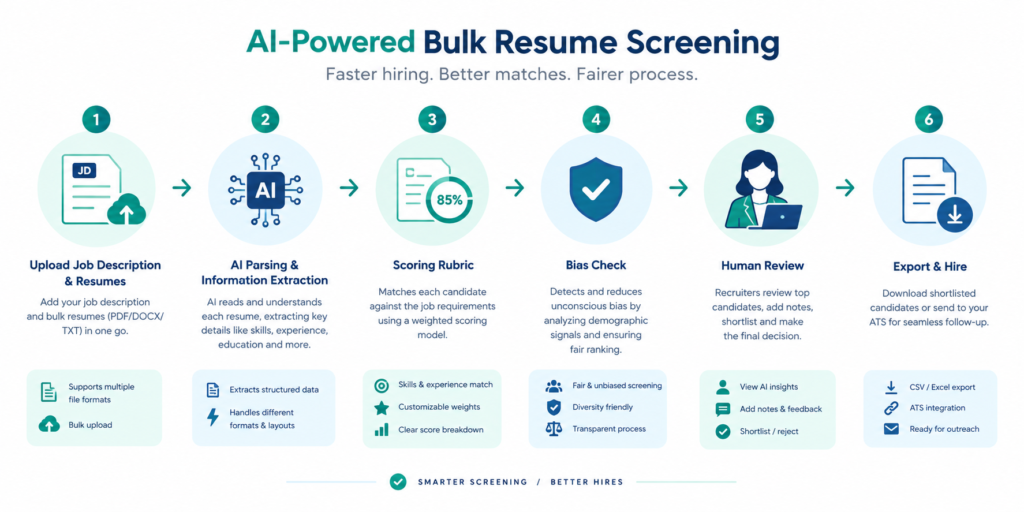
Modern AI screeners go beyond keyword matching. Using natural language processing (NLP) and contextual embeddings, they transform unstructured resume text into a structured data set that captures:
- Verified skill sets (e.g., Java, data visualization, Agile methodology)
- Experience depth and tenure across roles
- Education and certifications, with optional verification against public databases
- Soft‑skill indicators extracted from achievement statements
These signals are then compared against a job‑description‑driven rubric. Unlike traditional ATS that rely on exact phrase matches, AI can recognize synonyms, related concepts, and even transferable experience – a crucial advantage when candidates use varied terminology.
Key Benefits
- Speed: Hundreds of resumes processed in seconds (Bulk Resume Scanner can handle 500+ files in under 2 minutes).
- Consistency: Every applicant is evaluated against the same weighted criteria, eliminating reviewer fatigue bias.
- Explainability: Most platforms provide evidence‑linked scores, showing exactly which resume line justified each match.
- Bias mitigation: Anonymized inputs, removal of protected attributes and regular fairness audits keep the process equitable.
Step 1 – Craft a Precise, AI‑Ready Job Description
The quality of AI output hinges on the input you feed it. A well‑structured job description should contain three layers of criteria:
- Must‑have – non‑negotiable skills or certifications (e.g., “5+ years of Python development”).
- Preferred – desirable but not essential (e.g., “experience with Docker or Kubernetes”).
- Potential – growth traits you’re willing to train (e.g., “strong problem‑solving mindset”).
Assign a weight to each layer; for example, Must‑have = 60 %, Preferred = 30 %, Potential = 10 %. This weighted rubric becomes the backbone of the AI scoring engine.
Tip: Use the AI Resume Scanner to test how well a sample resume aligns with your description before bulk processing.
Step 2 – Prepare Your Resume Batch
Collect all applicant files into a single ZIP or folder. Accepted formats typically include PDF, DOCX, and sometimes LinkedIn export files. Ensure each file is under the size limit (most tools cap at 10 MB per resume). If you receive a mix of naming conventions, AI platforms will automatically assign a unique identifier, so you don’t need to rename files.
For high‑volume roles (e.g., retail associate), you might be uploading 500+ resumes at a time. MyResumeScan’s Bulk Resume Scanner supports such uploads and stores only resume fingerprints, safeguarding candidate privacy.
Step 3 – Configure the Scoring Rubric in the Tool
Most AI screeners provide a visual editor where you can paste your job description and then drag‑and‑drop criteria into the rubric. Set thresholds for each category:
- Minimum match for Must‑have: 75 %
- Preferred average: 50 %
- Potential highlight: any score above 30 %
Enable bias‑safeguards such as anonymization and third‑party fairness audits if the platform offers them. Document the rubric version in a shared folder for audit trails – compliance teams appreciate this traceability under GDPR or EEOC regulations.
Step 4 – Run the Bulk Screening
Upload your ZIP file, select the rubric, and launch the scan. Within seconds the AI will:
- Parse each resume into structured fields.
- Match skills, experience, and education against the weighted criteria.
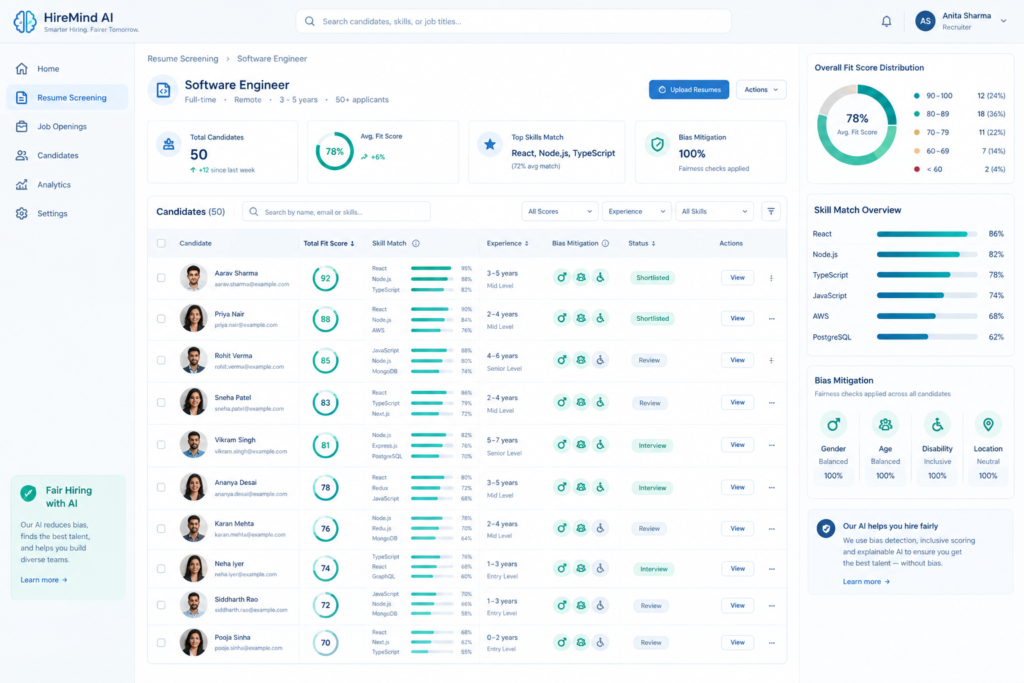
- Generate a numeric fit score (often 0–100) plus a categorical verdict (Advance / Review / Reject).
- Produce an evidence list linking each scored item back to the specific resume line.
Here is an example of a typical output dashboard:
Step 5 – Interpret Scores and Create Shortlists
Rather than treating the AI list as a definitive ranking, segment candidates into three buckets:
- Strong Match – Scores above 80 % and meeting all Must‑have criteria.
- Review – Scores between 60–79 % with most Preferred criteria met.
- Below Threshold – Scores under 60 % or missing a Must‑have.
Export the Strong Match bucket straight to your ATS for interview scheduling. For the Review bucket, assign a recruiter to conduct a quick deep‑read focusing on career logic, achievement specificity, and cultural fit – the qualitative step that AI cannot fully capture.
Step 6 – Keep Human Oversight for Borderline Cases
AI can inadvertently penalise candidates who use unconventional resume formats or who have career gaps explained in narrative form. A “human‑in‑the‑loop” review of the Review bucket catches these nuances. Additionally, ensure that any candidate flagged for potential bias (e.g., unusual name patterns) is manually evaluated to confirm fairness.
Document the rationale for any overrides in a shared spreadsheet. This audit trail is invaluable for compliance audits and for defending hiring decisions if challenged.
Step 7 – Integrate with Your Existing ATS
Most AI screeners, including MyResumeScan’s suite, offer native integrations with popular ATS platforms via API or direct sync. When integrated, AI scores are saved as custom fields on the candidate record, allowing recruiters to filter, sort, and report without leaving their familiar workspace.
Example internal link: see how the Resume Scanner with Job Description auto‑populates match scores into the candidate pipeline.
Step 8 – Measure Success and Iterate
Track key performance indicators (KPIs) for the new workflow:
- Time‑to‑shortlist: Minutes per 100 resumes vs. hours pre‑AI.
- Recruiter hours saved: Calculate based on average manual review time (≈15 min per resume).
- Diversity lift: Percentage increase in under‑represented candidates advancing to interview.
- Hire quality: 90‑day retention or performance rating of AI‑screened hires.
Quarterly, re‑run a sample batch with updated rubric weights to see how score distributions shift. Use these insights to fine‑tune the weighting or to add new data points such as verified certifications.
Real‑World Example: Tech Startup Hiring 30 Engineers
A Series A SaaS startup needed to staff 30 mid‑level engineers within 4 weeks. They received 1,200 applications via LinkedIn and their career site. By applying the workflow above with MyResumeScan’s Bulk Resume Scanner, they:
- Reduced initial screening time from 120 hours to 2 hours.
- Identified 110 Strong Match candidates, of which 30 were hired.
- Achieved a 20 % increase in gender‑diverse hires compared with the previous manual process.
- Saved an estimated $18,000 in recruiter costs (based on $35/hr rate).
The secret was a clear rubric that weighted “Cloud Architecture” as a Must‑have, and “Open‑source contributions” as Preferred. The AI highlighted several candidates with strong GitHub activity that would have been missed by keyword‑only filters.
Best Practices Checklist
- Document and version‑control your scoring rubric.
- Run bias audits quarterly – check for disparate impact on gender, ethnicity, or education.
- Maintain a human review stage for the Review bucket and any borderline cases.
- Ensure data privacy: store only fingerprinted resume data and delete after the hiring cycle.
- Integrate AI scores into your ATS to keep the workflow seamless.
- Continuously collect recruiter feedback to retrain or adjust the AI model.
Conclusion – Leverage AI, Preserve Humanity
Screening multiple resumes at once is no longer a nightmare; it’s an opportunity to make hiring faster, fairer, and more data‑driven. By pairing a robust, weighted rubric with an explainable AI screening engine, you can filter thousands of candidates in minutes while still keeping the final decision in human hands. The result? Shorter time‑to‑hire, reduced bias, and a talent pool that truly reflects the skills your organization needs.
Ready to try it yourself? Start with a free trial of MyResumeScan’s Bulk Resume Scanner and see how AI can transform your hiring pipeline today.