Why AI Is Now a Core Part of Technical Interview Prep
In 2026, more than 60% of Fortune 500 firms use AI‑driven screening tools, and the same companies are increasingly allowing (or even requiring) candidates to leverage AI assistants during live coding rounds. This shift means that interview success no longer hinges solely on memorizing algorithms; it also depends on demonstrating AI fluency—the ability to prompt, verify, and iterate on AI‑generated code while communicating your thought process clearly.
Data from recent studies shows candidates who integrate AI coaching into their routine are 3.7× more likely to reach final interview rounds and negotiate 24% higher salary offers. AI therefore acts as a force multiplier: it can accelerate problem‑solving, surface hidden skill gaps, and provide instant feedback on communication style.
However, the advantage only materializes when AI is used strategically, not as a shortcut. The following guide outlines a complete, ethical, and results‑driven preparation pipeline that blends AI tools with proven human‑centric study methods.
1. Build the Foundations: Resume, Keywords, and Story Bank
1.1 AI‑Enhanced Resume Scan
Before you even write a line of code, ensure your resume passes both ATS filters and AI‑driven resume scanners. Use MyResumeScan’s AI Resume Scanner to upload your CV and the target job description. The tool highlights missing keywords, suggests quantifiable impact statements, and even generates a preliminary STAR+R story for each major bullet point.
1.2 Crafting a Hyper‑Personalized STAR Bank
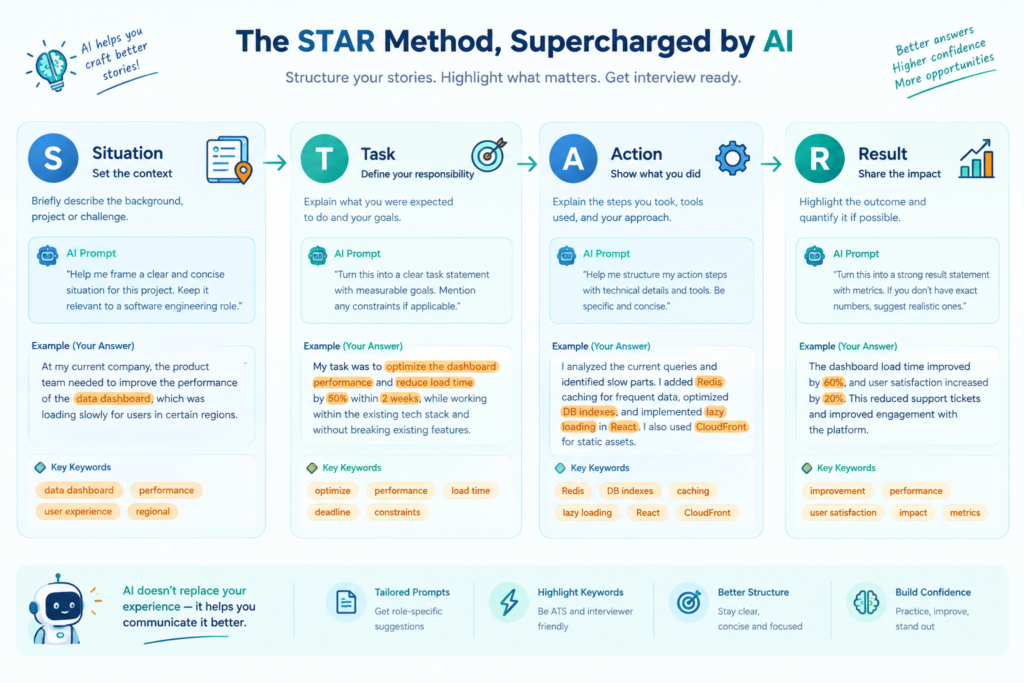
AI can turn a generic achievement into a targeted STAR narrative. Feed the scanner the highlighted bullet points and ask for a STAR+R rewrite that incorporates 8–10 role‑specific keywords (e.g., “scalable micro‑services,” “model‑monitoring,” “CI/CD pipelines”). Store 5–6 polished stories in a Google Doc, each with a concise Result metric (percentage uplift, cost reduction, latency improvement). This bank becomes the backbone of both behavioral and technical interview answers.
For a visual representation of this workflow, see the diagram below.
1.3 Aligning Stories with Role Archetypes
Identify whether the target role leans toward platform, product, data/ML, or leadership. Adjust the emphasis of each story accordingly: platform roles showcase latency and scalability, data roles focus on model accuracy and bias mitigation, leadership roles highlight cross‑functional influence and mentorship.
2. Choose the Right AI Tools for Each Interview Stage
2.1 Coding Assistance Platforms
Several AI coding assistants excel in real‑time hinting:
- LockedIn AI – offers live code suggestions, edge‑case checks, and a confidence index on the chosen algorithm.
- GitHub Copilot – integrates directly into VS Code, ideal for take‑home projects and rapid prototype building.
- Interview Coder – a low‑latency (<1 s) assistant that works inside CoderPad and can surface test‑case analysis without being visible to interviewers.
When practicing, start each session with a baseline solution (no AI), then invoke the assistant to see alternative approaches, compare runtimes, and discuss trade‑offs out loud. This mirrors the hybrid live‑coding rounds at Google and Canva, where candidates must justify why they kept or discarded AI‑suggested code.
2.2 System‑Design Canvas
For design interviews, tools like Cloudvyn AI provide a visual canvas where you can drop components (APIs, databases, message queues) and receive instant feedback on scalability, consistency, and cost. Pair this with a voice‑over narration: describe each decision, ask the AI for potential bottlenecks, and then critique the suggestions manually.
2.3 Behavioral Mock Interviews
MyResumeScan’s AI Mock Interview Practice simulates video‑based questions, records your response, and scores it on structure, keyword match, pace, and filler‑word usage. Use the feedback loop to tighten your STAR delivery, ensuring each answer stays under two minutes and hits at least three job‑specific verbs.
3. Structuring a Week‑Long Practice Routine
Consistency beats intensity. Adopt the following 5‑day cadence, adjusting for personal schedules:
- Monday – Resume & Keyword Alignment: Run the AI resume scanner, update STAR stories, and export the top three keywords for the target role.
- Tuesday – Baseline Coding: Solve 2–3 algorithm problems (arrays, hash maps, DP) on LeetCode without AI. Time each to 25 minutes.
- Wednesday – AI‑Assisted Coding: Re‑attempt Tuesday’s problems with LockedIn AI, focusing on prompt engineering (e.g., “Give me a O(N log N) solution for merge‑sort and suggest edge cases”). Record the session and note where AI helped or mis‑led you.
- Thursday – System Design + Voice‑Over: Use Cloudvyn to sketch a rate‑limiter architecture. Narrate each design choice, ask the canvas for latency estimates, then critique the AI’s suggestions.
- Friday – Behavioral Mock & Technical Setup: Complete a full mock interview on MyResumeScan, then perform a 3‑minute tech check (camera eye‑level, 5 Mbps upload, clear background).
Repeat the cycle, rotating focus areas (e.g., swap rate‑limiter for a recommendation engine on week two).
4. Technical Setup – Avoiding the “AI‑Fails”
AI interview platforms evaluate visual cues alongside speech. Follow these checklist items to keep the algorithm on your side:
- Camera at eye‑level, front‑lit with a soft‑white diffuser.
- External USB microphone; run a test recording with Audacity to ensure no background hum.
- Wired Ethernet connection or 5 Gbps Wi‑Fi; run a speed test 15 minutes before the interview.
- Neutral background (plain wall or blurred bookshelf) to avoid distraction.
- Disable notifications, close all non‑essential apps, and set the device to “Do Not Disturb”.
Set a reminder on your phone for a final 3‑minute check‑list before every live session.
5. Company‑Specific AI Prep
5.1 Research with AI‑Powered Market Analysis
Prompt an LLM with the company name and recent press releases to extract strategic priorities, tech stack, and product road‑maps. Convert the output into a 3‑bullet “Why I’m a fit” list that you can weave into every answer. For example: “At Canva, the focus on AI‑enabled design tools aligns with my work on a multi‑modal diffusion model that reduced rendering latency by 30%”.
5.2 Simulating Company‑Specific Questions
Feed the AI the job description and ask it to generate 5 technical and 5 behavioral questions tailored to the role. Run those through your mock‑interview platform, targeting the exact phrases the company uses (e.g., “cross‑functional collaboration”, “model monitoring”). This improves the keyword match score of AI interview systems that scan for exact terminology.
6. Ethical Use & Bias Mitigation
While AI dramatically accelerates preparation, ethical considerations remain critical:
- Transparency: If the interview explicitly allows AI, mention your usage and briefly describe the prompt you gave and how you validated the output.
- Hallucination Guardrails: Always run unit tests on AI‑generated code. Verify assumptions about data schemas and algorithmic complexity manually.
- Bias Awareness: AI models can perpetuate bias in language or code style. Cross‑check generated explanations for inclusive wording and avoid over‑reliance on jargon that masks shallow understanding.
These practices not only keep you compliant with emerging regulations (e.g., Illinois AI Video Interview Act) but also demonstrate professional judgment—an attribute many interviewers weigh heavily.
7. The Final 20‑Minute Pre‑Interview Checklist
- Review the role’s top three keywords and ensure they appear in your STAR stories.
- Run a 2‑minute mock video using MyResumeScan; verify subtitle accuracy.
- Open your coding IDE, load the AI assistant, and have a ready prompt template: “Provide a O(N log N) solution for ______. Include edge‑case tests and explain time‑space trade‑offs.”
- Check your internet speed, microphone levels, and camera framing.
- Take a deep breath, smile, and set a visible reminder (e.g., a photo of a mentor) to stay authentic.
Following this checklist reduces the likelihood of technical glitches and boosts the confidence index that AI interview platforms score.
Conclusion – Turn AI Into Your Personal Interview Coach
Preparing for a technical interview in 2026 is no longer a solo marathon; it’s a collaborative sprint with AI as a coach, not a crutch. By aligning your resume, building a keyword‑rich STAR bank, selecting the right AI assistants for coding, system design, and behavioral practice, and rigorously testing your technical setup, you position yourself to ace both the human and AI judges.
Start today: run an AI resume scan, schedule a mock interview on MyResumeScan, and claim the strategic edge that 3.7× more candidates are already enjoying.