Why a Free ATS Score Checker Matters in 2024
More than 75% of large employers rely on Applicant Tracking Systems (ATS) to filter the flood of resumes they receive. If your resume can’t be parsed or doesn’t contain the right keywords, it may be discarded before a human ever sees it. A free ATS score checker gives you a snapshot of how an ATS would read your document, letting you fix problems in seconds rather than after weeks of silence.
Unlike a generic “resume review,” an ATS score focuses on the exact criteria an automated system evaluates: parse‑ability, keyword coverage, formatting compliance, and quantifiable achievements. By obtaining a numeric match score—typically expressed as a percentage—you can benchmark your resume against the job description and prioritize the most impactful changes.
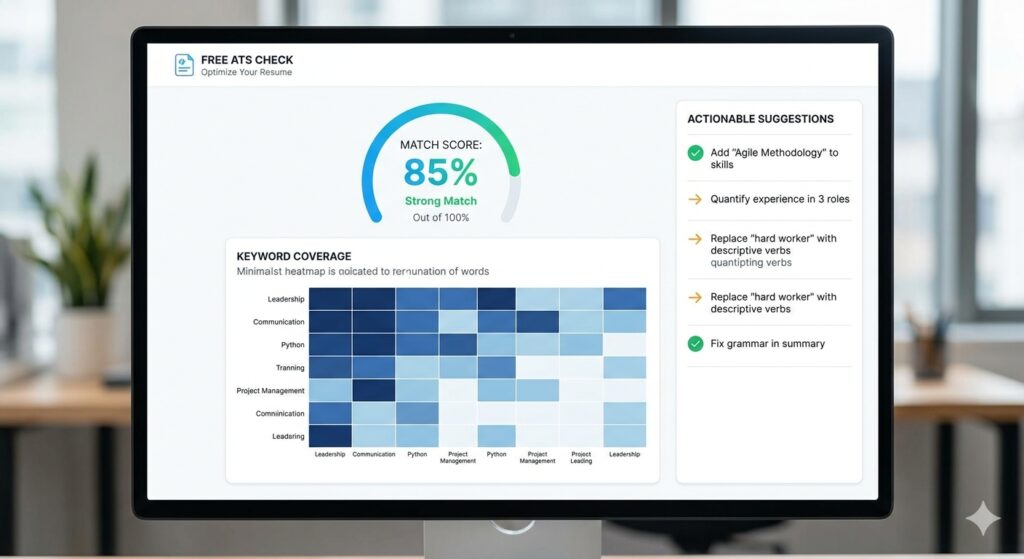
Below we’ll unpack how these tools work, what the scores really mean, and how you can turn a 45% rating into a 85% or higher, dramatically improving your interview odds.
How Free ATS Score Checkers Compute Your Match
Most free scanners follow a similar multi‑step algorithm, even though the exact weighting varies. The dominant signals, based on the research from tools like Enhancv, Jobalytics, and ResyMatch.io, look like this:
- Keyword Coverage (≈60% of the score) – The tool compares every word in the job posting with the words in your resume. Synonyms and industry‑specific terms are often recognized via AI, but exact matches carry the most weight.
- Section Completeness (≈15%) – ATS platforms expect standard headings (Contact, Experience, Education, Skills). Missing or unconventional sections lower the score.
- Formatting Readability (≈15%) – Single‑column layouts, standard fonts (Arial, Calibri, Times New Roman), and plain text ensure the ATS can parse the file without corruption.
- Quantified Achievements (≈10%) – Numbers, percentages, and impact metrics help both ATS algorithms and recruiters gauge relevance.
Behind the scenes, the scanner parses the uploaded PDF or DOCX, extracts plain text (often using libraries like PDF.js or Mammoth.js), then runs a series of checks:
- File type validation (PDF, DOCX, TXT) and size limit (usually 2 MB).
- Structure analysis – confirming headings, consistent date formats, and chronological order.
- Keyword extraction – tokenizing the job description, removing stop‑words, and creating a weighted list.
- Scoring – applying the weighted formula to generate an overall percentage and a breakdown per category.
The result is delivered in seconds, often with a downloadable PDF report that lists missing keywords, formatting red flags, and suggested bullet‑point rewrites.
Interpreting the Numbers: What’s a Good ATS Score?
While each platform defines its own thresholds, industry consensus (Kickresume, Jobalytics, SoundCV) suggests:
| Score Range | Interpretation | Recommended Action |
|---|---|---|
| 80‑100% | Strong – likely to pass most ATS filters. | Fine‑tune language, but you’re ready to apply. |
| 65‑79% | Moderate – passes many but not all systems. | Add missing keywords, simplify formatting. |
| 50‑64% | Weak – high risk of rejection. | Re‑write sections, ensure standard headings. |
| Below 50% | Critical – needs a major overhaul. | Consider using a dedicated ATS‑friendly template. |
Research from ResuScan shows resumes scoring 80%+ receive up to three times more interview calls than those under 50%, highlighting the practical payoff of hitting the “strong” band.
Top Free ATS Score Checkers to Try Right Now
Below is a quick comparison of the most popular free tools. All operate without credit‑card requirements and provide instant feedback.
| Tool | Key Features | Score Range | Unique Benefit |
|---|---|---|---|
| Enhancv Free ATS Resume Checker | 27 checks (content, layout, red‑flags); PDF/DOCX up to 2 MB; privacy‑first. | 0‑100% | Two‑tier parsing + writing issue analysis. |
| Kickresume ATS Resume Checker | 20+ technical checks; keyword gap analysis vs. database of successful resumes. | 0‑100% | Scores above 75% flagged as “good.” |
| Jobalytics Free ATS Score Checker | Matches resume to job description; unlimited free scans. | 0‑100% | Provides precise missing‑keyword list. |
| SkillSyncer | 2 scans/week on free plan; PDF export; keyword ranking by frequency. | 0‑100% | AI‑generated bullet refinements. |
| Loopcv Free AI CV Checker | No account needed; instant re‑scan after edits. | 0‑100% | Targets 80+ as optimal. |
All of these tools share a common workflow: upload → instant score → actionable report. Choose one that matches your preference for UI, depth of feedback, or privacy policy.
Step‑by‑Step Guide: Using a Free ATS Score Checker Effectively
- Gather the Job Description – Copy the full posting, including required skills, responsibilities, and any listed qualifications.
- Upload Your Current Resume – Use a clean PDF or DOCX file under the tool’s size limit. Avoid embedded graphics or tables.
- Review the Overall Score – Note whether you fall into the “strong,” “moderate,” or “weak” band.
- If the score is below 65%, plan a deeper revision.
- If it’s 65‑79%, focus on missing keywords and minor formatting tweaks.
- Above 80%? You’re ready to submit, but a final human read‑through is still wise.
- Analyze Keyword Gaps – Most tools highlight exactly which words from the posting are absent. Add them naturally in your experience bullet points or skills section.
- Fix Formatting Issues – Common red flags include:
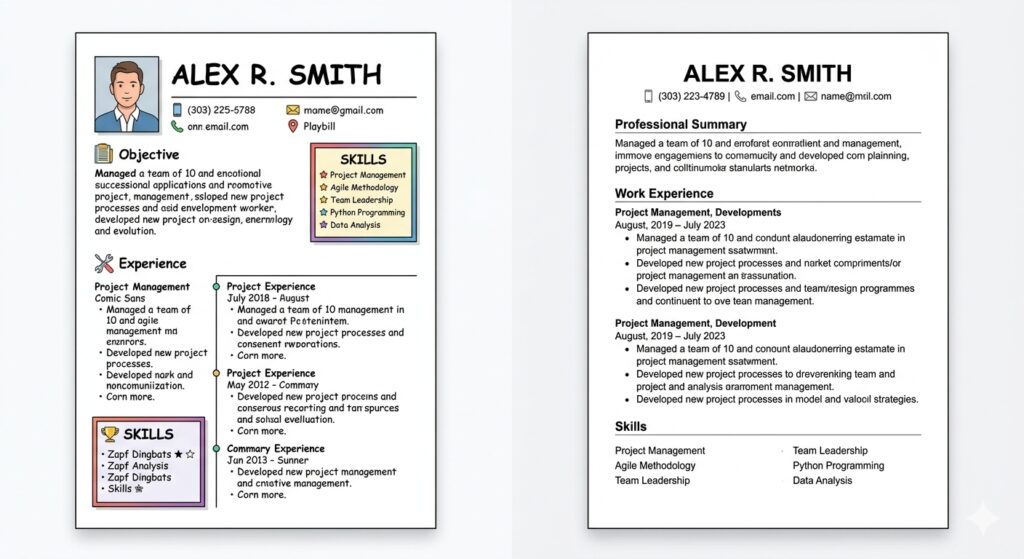
- Two‑column layouts or tables (use a single column).
- Headers/footers containing contact info (place details in the body).
- Non‑standard fonts or excessive colors (stick to Arial, Calibri, Times New Roman, black text).
- Quantify Achievements – Replace vague statements with numbers: “Increased sales by 22%” beats “Improved sales.” The ATS Resume Checker — Instant ATS Score and Resume Analysis on MyResumeScan automatically surfaces un‑quantified bullet points and suggests data‑driven alternatives.
- Re‑Scan – After editing, upload the revised file for another instant score. Aim for at least a 10‑point jump before you consider the resume ready.
Best Practices for Boosting Your ATS Match Score
- Tailor Every Application – Even if you have a solid base resume, swap in role‑specific keywords for each posting. The Resume Scanner with Job Description helps you match keywords quickly.
- Use Standard Section Headings – “Professional Experience,” “Education,” “Skills,” and “Contact Information” are universally recognized.
- Keep the Layout Simple – One‑column, left‑aligned text, bullet points, and consistent date formatting (MM/YYYY) reduce parsing errors.
- Avoid Hidden Text – Text placed in headers, footers, or inside images is invisible to many ATS parsers.
- Prioritize Hard Skills – Many ATS rank technical terms higher than soft‑skill adjectives. List programming languages, tools, certifications first.
- Proofread for Spelling – Misspelled keywords are treated as missing entirely.
Implementing these tweaks often yields a 15‑30% score boost without a full rewrite.
Privacy and Data Security: What to Expect
One frequent concern is whether uploading a resume to a free tool exposes personal data. Most reputable services (Enhancv, Loopcv, SoundCV) explicitly state that they do not store or share your document, and some even run the analysis entirely in the browser (e.g., the no‑login checker highlighted in research #6). However, always read the privacy policy—MyResumeScan’s privacy policy confirms that uploaded resumes are deleted after processing.
If you’re applying for highly sensitive positions (government, defense, etc.), consider using an offline parser or a browser‑only tool that never transmits data over the internet.
Beyond the Score: Using ATS Feedback to Craft a Better Narrative
While the numerical rating is handy, the true value of a free ATS checker lies in its detailed feedback. For example, many tools flag “generic language” or “missing achievements.” Treat these suggestions as a roadmap for storytelling:
- From: “Responsible for project management.”
To: “Led a cross‑functional team of 8 to deliver a $1.2M software project 3 weeks ahead of schedule, reducing costs by 12%.”) - From: “Good communication skills.”
To: “Delivered weekly stakeholder presentations that increased client satisfaction scores from 78% to 92%.”)
Such quantified, action‑oriented bullets not only improve the ATS score (they’re recognized as achievements) but also resonate with human reviewers.
When a Free Checker Isn’t Enough
If you consistently score below 60% despite multiple revisions, a deeper dive may be required:
- Consider a premium ATS‑optimizing service that offers a personalized rewrite.
- Use a dedicated ATS‑friendly template (many free options exist on MyResumeScan’s AI Resume Scanner).
- Hire a professional resume writer with expertise in applicant tracking algorithms.
Remember, the goal isn’t to “game” the system; it’s to present your qualifications in a format that both machines and humans can understand.
Conclusion: Turn Seconds into Opportunities
A free ATS score checker is a low‑effort, high‑reward tool that can transform a bland resume into an interview‑generating asset. By uploading your file, reviewing the instant match percentage, and applying targeted keyword and formatting fixes, you gain immediate insight into why a recruiter might be ignoring your application.
Combine the quick diagnostics with best‑practice resume writing—clear headings, quantified achievements, and a clean single‑column layout—and you’ll consistently land in the “strong” score band (80%+). In a job market where only a handful of candidates progress past the ATS, that extra 10‑15 points can be the difference between being seen and staying hidden.
Ready to test your resume? Grab a free ATS checker, scan your document, and watch your match score climb. The next interview could be just a few clicks away.